CampaignsAdded October 14, 2026
Email Studio
A new email editor where you design together with AI.
Describe the email you need and Email Studio designs it. You only fine-tune the details and hit send.
You describe the email, Email Studio designs it
What you can do with it
- 01Design an email from a single promptYou describe the campaign, pick products and get two proposals side by side: a newsletter from the AI Assistant and a design from Email Studio. You choose the one you like more.
- 02Use over 100 ready-made templatesFor different industries and occasions, already in your brand colors. If a template looks right but the topic does not, AI rewrites its copy for your store and keeps the whole style.
- 03Edit photos without leaving the editorCrop them to the email format, add an effect, a frame, a sticker or a "Black Friday" style caption, and AI removes the background in one click, leaving just the product.
- 04Keep your branding consistentBlocks with bestsellers or new arrivals pull colors, logo and buttons from your brand settings automatically.
Newsletter examples with Email Studio
One prompt, your brand colours and logo, products from your shop catalogue.
edrone AIBased on the best campaign: „Hoodies for changeable spring weather” brought half as many clicks again.

Alpine Pro · outdoor apparel · subject: Hoodie for autumn days
PromptEarly access to new colours for club members, 4 models.
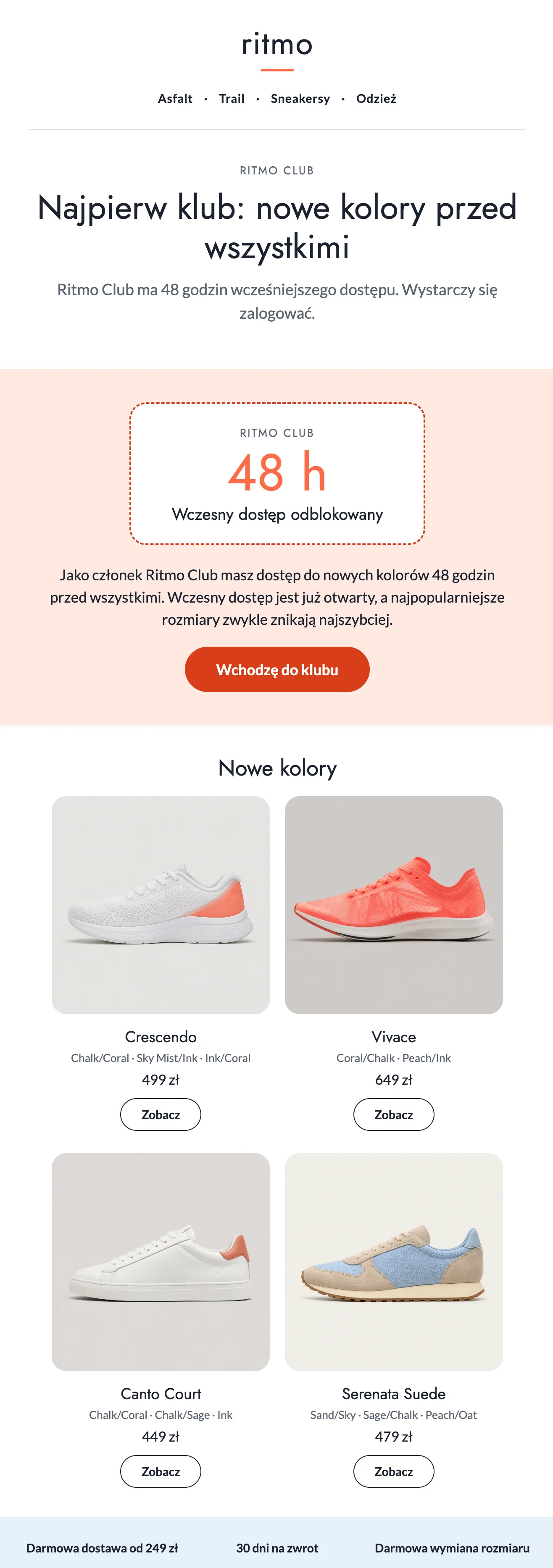
ritmo · sports footwear · subject: Club first
Why it is worth it
- Faster from idea to sendInstead of building an email from scratch, you start from a ready design and only fine-tune it.
- Everything in one placeNo graphic tools and no passing files around.
- The email looks like your brandEven when you make it in a hurry.
- Full controlAI proposes, but you decide what stays. You can undo every change with one click.
Email Studio opens when you design a message: in the Newsletter → Email tab and in automation scenarios (Automations → Ready Flows → Edit design). The feature is available to all edrone customers and needs no setup.